Skip to the main content.
Markets We Serve

Learn how our solutions meet the unique needs of various industries worldwide.

Advanced Technologies

Dive into the future with our state-of-the-art technologies leading the industry.

Stay Informed

Get the latest updates, insights, and resources to keep you ahead of the curve.

SECTION 1 VOYAGER BRIDGE

Integrated Bridge Systems

VOYAGER BRIDGE


FURUNO VOYAGER is a next-generation bridge system enhancing maritime operations with intuitive interfaces and integrated sensor data for improved efficiency..

FURUNO VOYAGER Bridge System's Advanced Capabilities


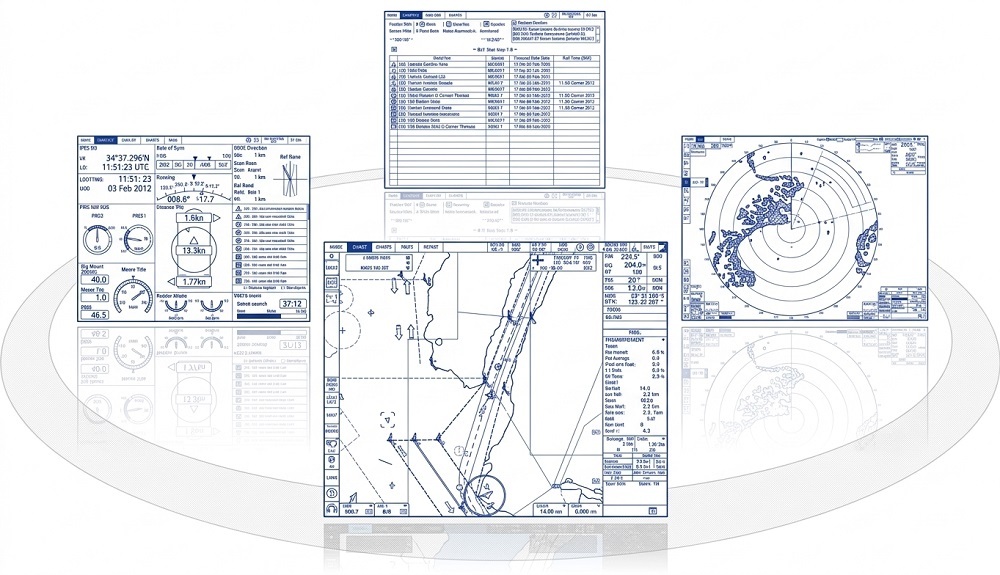
FURUNO VOYAGER, a next-generation bridge system, has been crafted using our extensive expertise in sensor devices, network integration, and software development. The FURUNO VOYAGER bridge system provides multifunction workstations with seamless displays of Radar/Chart Radar, ECDIS, Conning, and Alert Management System data. It features a completely new and intuitive user interface, developed in strict accordance with the latest safety and navigation standards.

The total network sensor integration enhances situational awareness for mariners. A straightforward display presentation simplifies and streamlines navigational tasks. Common duties such as route planning, navigation status monitoring, log-keeping, alarm awareness, and day-to-day chart management are facilitated by a common workstation layout and redundancy of display and control. Watchstanders benefit from a reduced workload and significant freedom to move around the bridge, with all necessary information accessible in various displays and locations.

KEY FEATURES OF FURUNO VOYAGER


Shape

Multifunction display (MFD) capability
FURUNO VOYAGER offers workstations that combine flexibility and redundancy. Users may easily select ECDIS, Radar/Chart Radar, Conning display or Alert Management System at any multifunction display.

Shape

Track Control System permits automatic steering along the set route
FURUNO VOYAGER features Track Control System through integration of ECDIS and autopilot. This enables the vessel to keep on the plotted route automatically with minimum intervention from the navigator.

Shape

New user interface delivers straightforward, task-based operation
Stress-free operation with the well-designed control units, contextual menu, task-based user interface by combination of Status bar and InstantAccess bar and InstantAccess knob.

Product Manager at Furuno

"The FURUNO VOYAGER bridge system represents a significant leap forward in maritime technology, offering unparalleled integration and intuitive operation that enhances both safety and efficiency at sea."

Multifunction display (MFD) capability

FURUNO VOYAGER delivers versatile, redundant workstations designed for adaptability. Operators can effortlessly switch between ECDIS, Radar/Chart Radar, Conning displays, or the Alert Management System—all from any multifunction screen. This streamlines navigation tasks, reduces workload, and grants navigators the flexibility to move freely across the bridge while accessing critical information from multiple displays and locations.

FURUNO VOYAGER MFD CAPABILITY
FURUNO VOYAGER ECDIS MODE

ECDIS Mode


 In ECDIS mode, operators have the ability to create and modify route plans. Additionally, they can monitor the ship's behavior in relation to the planned route. Detailed parameters for each waypoint within the route are accessible in the route information window.

FURUNO VOYAGER RADAR MODE

Radar/Chart Radar Mode


In Radar/Chart Radar mode, operators can observe the radar image surrounding the ship, thereby improving their situational awareness with information about nearby objects above the sea surface. This mode serves as a crucial tool for avoiding collisions while the ship is in motion.

Conning Mode


In Conning display mode, navigators are provided with sensor information and real-time navigation data through a carefully designed display.


The conning display includes the following information:

  • Heading
  • Pitch and Roll
  • Rudder angles
  • Rate of Turn
  • Position fix
  • Speed (bow speed, longitudinal speed, and stern speed)
  • Propeller pitch
  • Wind speed and direction (both true and relative)
  • Thrusters pitch
  • Alert list
  • BNWAS indication
  • Date and time, etc.
FURUNO VOYAGER CONNING MODE

Alert Management System mode 

The Alert Management System organizes and ranks notification statuses and details. Its intuitive interface allows users to swiftly recognize alert situations and determine the necessary steps to address the root cause of the notification. The Alert Management System complies with MSC.302(87) Performance Standards for Crisis Alert Management.

features_05
features_07

Active Alert


List of alerts currently active can be viewed. By clicking on the icon in the ACTIVE ALERT page, the list of icons used in the Alert Management System and their descriptions can be shown as a pop-up window.

features_08

Alert  Log


 Alert history can be viewed in chronological order. The source of alerts, and the date and time each alert was raised, acknowledged and rectified are shown.

features_09-1

Alert List


List of alerts available for each alert source can be viewed.

Track Control System permits automatic steering along the set route

The FURUNO VOYAGER system is designed to enhance maritime safety and efficiency by integrating a Track Control System with ECDIS and autopilot. This integration allows vessels to maintain their course with minimal navigator input. Key features include adaptable steering control, comprehensive route planning via ECDIS, and improved position accuracy through a robust data validation process. Additionally, the system proactively alerts operators to navigational hazards and warnings, ensuring the vessel's safety.

features_10_ph1

NEW USER INTERFACE DELIVERS STRAIGHTFORWARD, TASK-BASED OPERATION

features_11

Stress-free operation with the well-designed control units


A - Common key assignment is arranged for the common tasks, such as EBL, VRM controls, on the control units of ECDIS and Radar/Chart Radar.

B - Operation scheme close to a PC with the use of the trackball.
Trackball: to move the cursor and select an object.
Left-click: to perform/con.rm the action related to the selected object.
Right-click: to display the contextual menu while the cursor is on the display area, and to cancel the action done on the selected object.
Scrollwheel: to select menu items.


C- ECDIS Control Unit: Full QWERTY keyboard for easy entry of route, event and waypoint names.
Radar Control Unit: Functions specific to Radar can be carried out.

features_15

Contextual menu


The contextual menu offers quick access to all actions relevant to the cursor's position, facilitating easy task execution.

features_16

Task-based user interface by combination of Status bar and InstantAccess barTM 


The FURUNO VOYAGER interface features a well-organized set of operational tools that simplify navigation tasks. The "Status Bar" at the top of the display clearly shows the operating mode and status, allowing for easy, one-click access to the navigator's main functions. On the left side, the InstantAccess barTM provides direct control over the on-screen presentation's features and attributes. These tools offer a straightforward, task-oriented operation, ensuring that all multi-function display information is always visible. This setup enables the operator to efficiently carry out navigational tasks without navigating complex menus, thereby maintaining situational awareness.

features_17

InstantAccess knob


By turning and pressing the InstantAccess knob, the operator can effortlessly navigate to the items in the InstantAccess barTM.

FURUNO VOYAGER onboard navigation network system

network_01

The FURUNO VOYAGER integrates two distinct networks that connect all onboard navigation equipment, including multifunction displays and various sensors: the Network for Integration and Interswitch, and the Network for Sensor Integration. 

The navigation system features duplicated subsystems to prevent the loss of navigational functions in the event of a single point of failure. Since the multifunction display can operate as a radar, ECDIS, conning information display, and alert management system, navigation tasks can be performed from any interfaced multifunction display, optimizing system availability.

Network for Integration and Interswitch (Gigabit Ethernet) is used to communicate the following data:

  • Radar interswitching
  • TT and AIS target data
  • Harmonization of database (charts, routes, etc.)

    Network for Sensor Integration (combination of 100 Base-TX Ethernet and IEC 61162-1/IEC 61162-2) is used to communicate the following data:
  • Sensor data
  • Alert information

Contact us for all inquiries regarding our Integrated Bridge Systems.